Usage
Settings
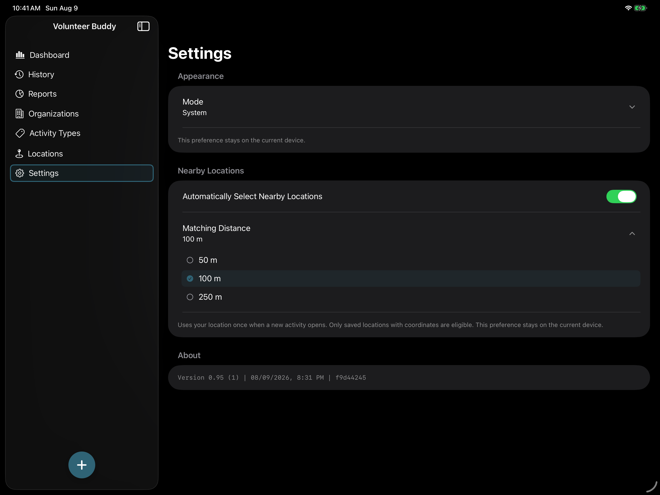
Settings contains two device preferences — appearance and nearby-location behavior — plus app build information under About. Both preferences apply to the current device and do not sync to your other devices. Syncing itself is managed in iOS Settings under [your Apple account] > iCloud > Volunteer Buddy, not in the app.
01
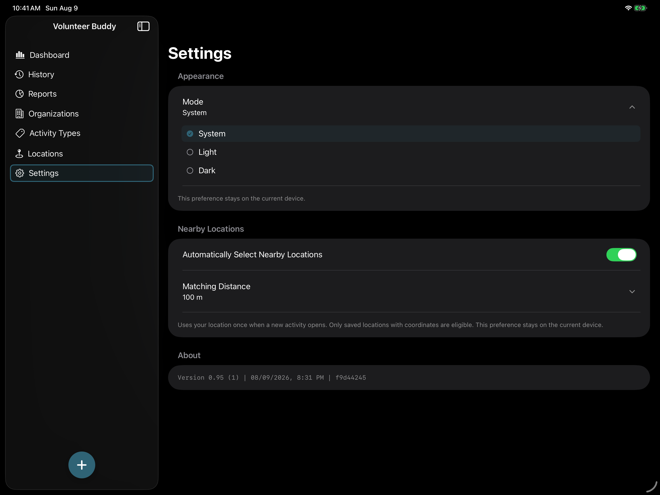
Choose appearance
Appearance can follow the system setting or be pinned to Light or Dark on the current device. This preference does not sync to your other devices.
02
Control nearby-location behavior
Automatic nearby selection runs once when a new activity opens. Choose whether it is enabled and set the matching distance to 50, 100, or 250 meters. Only saved locations with coordinates can be selected automatically.